
Spec2Cloud - Spec-Driven Development for Azure with GitHub Copilot Agents
Spec-driven development is having a moment right now. The idea is simple – instead of jumping straight into code (or “vibe coding” as the kids call it), you write structured specifications first and then let AI agents turn those specs into working software. I’ve been keeping an eye on this space for a while and recently stumbled upon Spec2Cloud, a framework coming from Microsoft’s EMEA App Innovation GBB team that takes this concept and wires it directly into Azure.
So I spent some time poking around both the framework repo and the template catalog, and here’s what I think.

What is Spec2Cloud?
At its core, Spec2Cloud is an agent-driven workflow that takes you from a product idea to a deployed application on Azure. It does this by orchestrating a team of specialized GitHub Copilot agents – think of it as a virtual dev team where each agent has a specific role.
There are six agents:
- PM Agent (
@pm) – takes your product idea and turns it into a Product Requirements Document and Feature Requirements Documents - Dev Lead Agent (
@dev-lead) – consolidates engineering standards and ensures architectural compliance - Dev Agent (
@dev) – breaks features into tasks, writes code, or delegates work to GitHub Copilot coding agent - Azure Agent (
@azure) – generates Bicep templates, GitHub Actions workflows, and handles deployment to Azure - Tech Analyst Agent (
@tech-analist) – reverse-engineers existing codebases into specifications - Modernization Agent (
@modernize) – assesses technical debt and creates modernization strategies
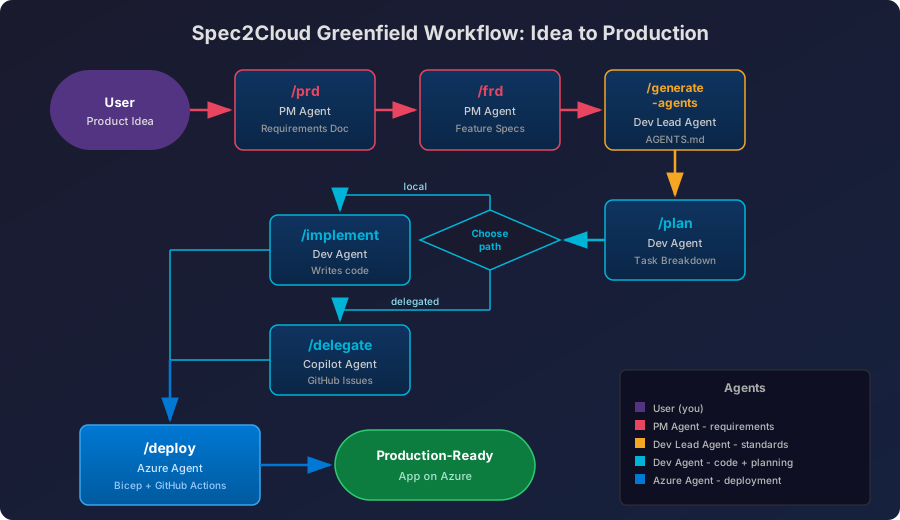
The agents communicate through a set of slash commands: /prd, /frd, /plan, /implement, /deploy, and so on. You start by telling the PM agent what you want to build, and the system walks you through a structured pipeline all the way to deployment.
What’s interesting is that Spec2Cloud supports three distinct workflows. Greenfield is for new projects – idea to production. Greenfield Shell-Based starts from predefined architectural baselines (they have .NET and Python reference shells) and implements your requirements on top. Brownfield is for existing codebases – it reverse-engineers your code into specs and documentation, with optional modernization planning.
The whole thing installs into your repo with a one-liner curl script and adds agents, prompts, MCP server configuration, and optionally a dev container setup. It’s MIT licensed and not an official Microsoft product, though it clearly has Microsoft DNA all over it.
Here’s how the greenfield workflow looks end to end:
Real-world potential – beyond the demos
Ok, so the demos look cool. “From idea to production in minutes.” But let’s talk about where this could actually help in the real world.
The brownfield workflow is where I see the most immediate value. Every team I’ve worked with has at least one legacy app that nobody fully understands anymore. The original developer left three years ago, documentation is either nonexistent or hilariously outdated, and everyone is terrified to touch it. Running /rev-eng on that codebase to generate structured specs, feature docs, and technical task breakdowns – that’s genuinely useful. Even if the output isn’t perfect, having a starting point for documentation that links back to actual code files is better than what most teams have today, which is nothing.
The greenfield workflow is more interesting for rapid prototyping and proof-of-concept work. If you need to spin up a demo for a customer or validate an architectural approach quickly, having agents handle the scaffolding, infrastructure-as-code generation, and CI/CD pipeline setup saves real time. The fact that the Azure Agent generates Bicep templates and GitHub Actions workflows means you’re not starting from scratch on the infrastructure side.
For platform engineering teams, the standards integration through APM (Agent Prompt Management) is worth paying attention to. You can encode your organization’s engineering standards, security requirements, and architectural patterns into the system so that every generated project follows your guardrails. That’s the kind of thing that could scale well across larger organizations.
The template catalog and the VS Code extension add another layer – curated, production-ready templates for common scenarios like AI apps, data solutions, and app modernization. Think of it as Azure quickstart templates but with the spec-driven workflow baked in.
Shortcomings – and there are a few
Let’s be honest about where Spec2Cloud falls short right now.
It’s early. Very early. Several features are marked as “TODO” – including the VS Code extension installation method and the APM CLI. The template catalog showed zero templates when I checked the web interface. That’s not confidence-inspiring for anyone looking to adopt this in a production workflow today.
The agent quality problem. This isn’t unique to Spec2Cloud, but it’s a real issue. AI agents frequently don’t follow all the instructions you give them. The spec-driven approach assumes that specifications will be faithfully translated into code, but in practice, the gap between what you specify and what gets generated can be significant. You still need someone reviewing every step of the pipeline.
GitHub Copilot dependency. You need GitHub Copilot access, specifically the agent capabilities. That’s not free, and depending on your organization’s licensing situation, it might be a blocker. The agents themselves are configured to use specific models (o3-mini for PM, Claude Sonnet 4 for most others), which adds another dependency layer.
Azure lock-in. This is by design – Spec2Cloud is an Azure-first framework. If you’re multi-cloud or not on Azure, this isn’t for you. The deployment workflow generates Bicep and targets Azure services specifically. There’s no Terraform option, no AWS or GCP path.
Documentation gaps. While the repo has a decent structure with architecture docs, workflow guides, and examples, the actual depth of documentation is thin. The examples show two scenarios (elderly care AI agent for greenfield, marketing campaign app for brownfield) but don’t go deep enough to understand what the output actually looks like in practice.
No versioning. There are no release artifacts or version numbers. You’re pulling from main. For a tool that’s supposed to help you build production applications, that’s a bit ironic.
Spec2Cloud vs GitHub Spec Kit
The obvious comparison here is GitHub Spec Kit, GitHub’s own spec-driven development toolkit. They’re both in the same space but take notably different approaches.
Spec Kit is agent-agnostic, Spec2Cloud is not. Spec Kit works with 17+ AI coding environments – Claude Code, Cursor, Gemini, Windsurf, Copilot, you name it. Spec2Cloud is tightly coupled to GitHub Copilot agents. If you want flexibility in your tooling, Spec Kit wins here hands down.
Spec Kit is cloud-agnostic, Spec2Cloud is not. Spec Kit doesn’t care where you deploy. It’s purely about the specification and planning workflow. Spec2Cloud goes all the way to Azure deployment with Bicep generation and GitHub Actions CI/CD. If you’re an Azure shop, that’s a feature. If you’re not, it’s a wall.
Spec2Cloud has more structure. Six specialized agents with defined roles vs Spec Kit’s simpler slash command workflow (/specify, /plan, /tasks). Spec2Cloud’s multi-agent approach is more opinionated but also more automated – it tries to handle the entire lifecycle. Spec Kit is more of a planning tool that then hands off to whatever coding workflow you prefer.
Maturity. Spec Kit has a Microsoft Learn training module and has been analyzed in depth by Martin Fowler’s team and Scott Logic. Spec2Cloud still has TODOs in its README. The gap in community validation is significant.
The criticism applies to both. Independent reviews of Spec Kit found it generated excessive markdown (thousands of lines of specs for simple features), was significantly slower than iterative prompting, and didn’t result in better code or fewer bugs. Scott Logic’s review found traditional vibe coding was about ten times faster. These fundamental questions about whether the spec-driven approach actually delivers value apply equally to Spec2Cloud – maybe even more so, given that Spec2Cloud adds additional complexity with its multi-agent orchestration.
Here’s how they stack up side by side:
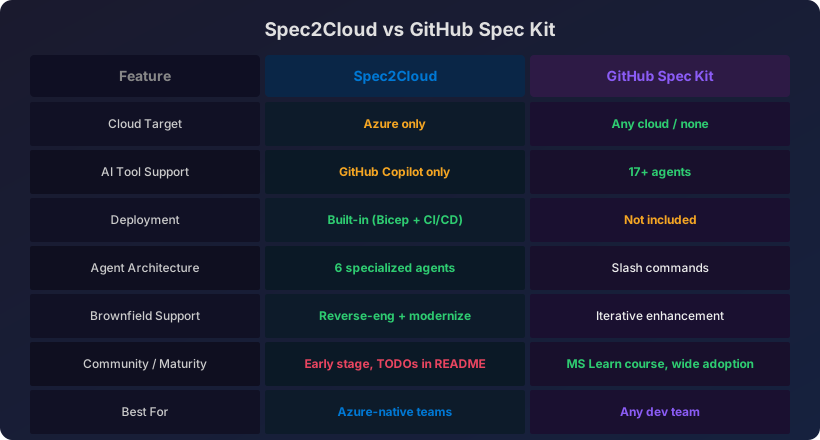
My take: if you just want to experiment with spec-driven development in general, start with Spec Kit. It’s more mature, more flexible, and has way more community feedback to learn from. If you’re specifically an Azure shop looking for an end-to-end framework that goes from idea to deployed infrastructure, Spec2Cloud is the more opinionated and Azure-native option – but you’re betting on a much earlier-stage project.
Where this is going
Spec-driven development as a concept isn’t going away. The idea of adding structure to AI-assisted coding makes sense, especially for teams where consistency and compliance matter. The question is whether dedicated frameworks like Spec2Cloud and Spec Kit are the right way to do it, or whether this functionality will just get absorbed into the AI coding tools themselves.
I think Spec2Cloud has potential, specifically because of its Azure-native approach. The brownfield reverse-engineering workflow solves a real pain point. The multi-agent architecture is ambitious and, if the agent quality improves (and it will – models are getting better fast), the idea of a coordinated virtual team handling different aspects of the SDLC could become genuinely practical. The fact that it comes from Microsoft’s GBB team and has landed in the Azure-Samples org suggests there’s organizational backing, even if it’s not an official product yet.
But right now? It’s a prototype. The TODO items, the empty template catalog, the lack of versioning – this is a framework that’s showing its vision more than its readiness. If you’re the kind of person who likes to get in early on tools and give feedback that shapes the direction, go for it. If you need something production-ready today, you’ll be disappointed.
My recommendation: bookmark it, try the brownfield workflow on one of your legacy apps to see what it generates, and keep an eye on the repo. Don’t build your team’s development process around it yet. The spec-driven development space is moving fast and Spec2Cloud’s tight Azure integration could make it the go-to choice for Azure teams – but it needs a few more months of baking.
Have you tried Spec2Cloud or Spec Kit? I’m curious what your experience has been. Drop a comment below :)
Comments